


Retail & E-Commerce ERP Systems: Comparing Omnichannel Inventory Features

TABLE OF CONTENT
Why omnichannel inventory is more difficult than standard inventory management
03 capabilities every retail ERP system comparison should examine
Retail ERP system comparison
Which is the best ERP for eCommerce?
06 scenarios to test before choosing an ERP system
Building the right omnichannel ERP architecture with AHT Tech
Conclusion
Retailers no longer operate through a single sales channel. A customer may discover a product on social media, check its availability on a website, purchase it through a mobile app, collect it from a nearby store and later return it at another location.
Behind this seemingly simple experience is a complex chain of inventory, payment, fulfilment and financial processes.
The challenge is that many retail businesses still manage eCommerce, point-of-sale systems, warehouses and accounting through separate applications. Stock movements are transferred between systems through scheduled integrations, spreadsheets or manual updates. Consequently, the inventory shown online may not reflect what is actually available in stores or warehouses.
This is why a retail ERP system comparison should look beyond accounting, purchasing and basic inventory control. The most important question is whether the platform can coordinate inventory and orders across every channel in near real time.
This guide compares five leading omnichannel ERP systems, focusing on three capabilities that have a direct impact on retail performance:
- Multi-warehouse inventory synchronisation
- BOPIS, or Buy Online, Pick Up In Store
- Point-of-sale and eCommerce integrations
Rather than declaring one universal winner, this comparison identifies which ERP is most suitable for different retail operating models.
Why omnichannel inventory is more difficult than standard inventory management
Traditional inventory management answers a relatively simple question:
How many units are physically stored in each location?
Omnichannel inventory management must answer a more important question:
How many units can safely be promised to a particular customer, through a particular channel, at this moment?
A warehouse may physically hold 100 units, but some of that stock may already be committed to online orders, reserved for store replenishment, undergoing quality inspection or moving between locations. Publishing the entire on-hand quantity to every sales channel can therefore lead to overselling.
A capable retail ERP should distinguish between several inventory states:
| Inventory status | What it means |
| On hand | Physical units currently recorded at a location |
| Available | Units that can still be allocated to new orders |
| Committed | Units assigned to confirmed orders |
| Reserved | Stock protected for a customer, store or sales channel |
| In transit | Products moving between warehouses or stores |
| Damaged or quarantined | Physical stock that should not be sold |
| Available to promise | The quantity and date the business can confidently offer |
The strongest omnichannel ERP systems do not simply store these numbers. They update availability when orders, returns, transfers, receipts and POS transactions occur.
03 capabilities every retail ERP system comparison should examine
1. Multi-warehouse inventory synchronisation
A retailer with one warehouse may be able to operate with a relatively simple eCommerce integration. Complexity increases quickly when the business adds:
- Regional distribution centres
- Physical retail stores
- Dark stores
- Third-party logistics providers
- Marketplace fulfilment centres
- Temporary or pop-up locations
- Consignment inventory
The ERP must maintain inventory by location while giving sales channels a controlled view of available stock.
For example, a retailer may have ten units in Store A but choose to expose only seven units online. The remaining three units act as safety stock for walk-in customers. Without buffer rules, an online promotion could consume all available inventory and leave customers standing in the store unable to buy the product.
A strong multi-warehouse ERP should support:
- Location-level inventory visibility
- Warehouse-to-warehouse transfers
- Automated replenishment rules
- Channel-specific safety stock
- Inventory reservations
- Barcode-based receiving and picking
- Transfer stock and expected arrival dates
- Order routing based on distance, capacity or cost
- Cycle counting without stopping store operations
- A consistent inventory ledger across sales and finance
“Real-time inventory” should also be examined carefully. In some architectures, real time means an immediate transaction inside the ERP, in others, it means synchronisation every five, fifteen or thirty minutes through a connector. That difference becomes critical during flash sales, product launches and seasonal peaks.
2. BOPIS and click-and-collect workflows
BOPIS is sometimes treated as a delivery option added to the eCommerce checkout. Operationally, it is much more complex.
A complete BOPIS workflow should include the following sequence:
- The website identifies eligible pickup stores.
- Inventory availability is checked by location.
- Stock is reserved for the online customer.
- The order is routed to the selected store.
- Store employees receive a picking request.
- The product is located, scanned and staged.
- The customer receives a ready-for-collection notification.
- Identity or order information is verified at pickup.
- Payment is captured or confirmed.
- Inventory and financial records are completed.
If one step is missing, the customer experience can break down.
The website may confirm an order that the store cannot find. A store employee may sell the reserved item to a walk-in shopper. A customer may arrive before the order has been prepared. Alternatively, the order may be collected without the ERP reducing the available inventory.
Effective BOPIS functionality therefore requires more than a “pickup in store” button. It depends on reservation logic, store task management, customer communication, payment handling and exception workflows.
3. POS and eCommerce integration
POS integration should be bidirectional. Sending daily sales totals from the POS to accounting is not enough for an omnichannel business. The ERP, eCommerce platform and POS should exchange several types of information:
| Data object | Typical synchronisation requirement |
| Products and variants | ERP or product system to POS and eCommerce |
| Prices and promotions | Shared consistently across channels |
| Inventory movements | POS and eCommerce back to the ERP |
| Customer profiles | Available across online and physical stores |
| Orders | Consolidated into a unified order history |
| Payments | Reconciled with sales and financial records |
| Returns and exchanges | Reflected across inventory and accounting |
| Loyalty balances | Updated after online and in-store transactions |
| Gift cards | Redeemable through permitted channels |
| Tax information | Applied and posted consistently |
Can a customer return an online order at a physical store? Can an employee view inventory in another branch? Can a store order an unavailable item for home delivery? Can the POS continue working temporarily when the internet connection is interrupted?
These scenarios reveal whether the retailer has a connected omnichannel platform or merely several systems exchanging basic data.
Retail ERP system comparison
The following table provides a practical overview of five major platforms.
| ERP system | Multi-location inventory | BOPIS capabilities | POS and commerce model | Suitable business profile |
| Odoo | Multiple warehouses, storage locations, routes, replenishment and integrated inventory workflows | Native Click & Collect can be configured with selected pickup warehouses | Native Odoo POS and eCommerce, with additional connectors or custom APIs available | Growing retailers seeking a configurable, integrated ERP at a manageable level of complexity |
| Microsoft Dynamics 365 Commerce | Enterprise inventory visibility, store inventory management and distributed order management | Native customer-order, store-pickup and order-processing workflows | Integrated Dynamics 365 Commerce POS, eCommerce and supply-chain applications | Medium and large retailers with sophisticated fulfilment and store operations |
| Oracle NetSuite | Multi-location inventory with location-level quantities and cross-subsidiary fulfilment options | Store Pickup supports eligible locations, fulfilment requests and inventory buffer quantities | SuiteCommerce, SuiteCommerce InStore and third-party commerce connectors | Multi-entity retailers looking for cloud financial management, commerce and operational control |
| SAP Retail | Consolidated omnichannel inventory across online stores, warehouses and physical shops | Click-and-collect order creation, picking requests and order handover processes | SAP Customer Checkout and integrations with enterprise retail applications | Large retailers with complex pricing, international operations and high transaction volumes |
| Acumatica | Multiple warehouses, native warehouse management, barcode workflows and channel inventory publishing | BOPIS can be delivered through the selected commerce, POS and fulfilment architecture | Connectors for Shopify, Amazon, BigCommerce and retail POS applications | Mid-market retailers, distributors and digital merchants with inventory-intensive operations |
The feature information above is based on current vendor documentation. Exact capabilities can vary according to product edition, licence, configuration and connected applications.
Odoo: A unified and configurable retail platform

Odoo combines eCommerce, POS, inventory, purchasing, accounting, CRM and other business applications within one platform.
Odoo 19 supports multiple warehouses and detailed storage locations. Its eCommerce configuration includes Click & Collect, allowing retailers to designate the warehouses from which customers can collect orders. Odoo POS is browser-based and is designed to remain operational during temporary network interruptions.
This native application model can reduce the number of separate integrations required for a growing retail operation.
Where Odoo performs well
- Businesses seeking one platform for ERP, eCommerce and POS
- Retailers that need configurable warehouse and replenishment workflows
- Companies replacing spreadsheets and disconnected applications
- Organisations that expect to customise processes or develop additional modules
- Small and mid-sized retailers balancing capability with implementation complexity
Points to validate
Retailers with highly sophisticated order orchestration should confirm whether standard warehouse routes can support their requirements. Complex scenarios involving fulfilment cost optimisation, store workload, split orders and advanced allocation may require additional configuration or custom development.
Odoo is often a strong candidate for businesses that want flexibility without immediately adopting a heavyweight enterprise retail environment.
Microsoft Dynamics 365 Commerce: Strong enterprise omnichannel execution
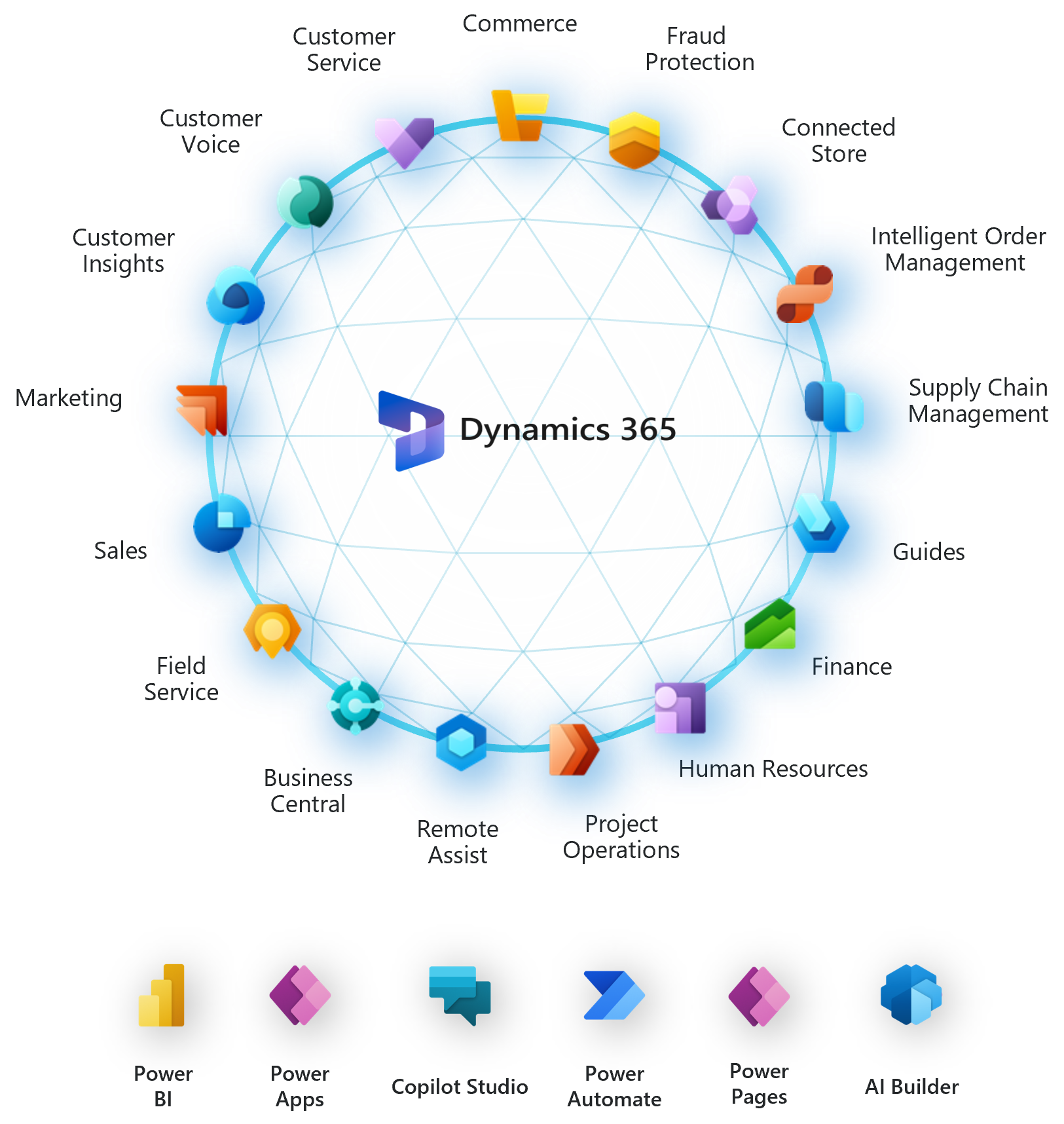
Microsoft Dynamics 365 Commerce provides some of the most extensive native capabilities for retailers operating physical stores, eCommerce channels and distributed fulfilment networks.
Its POS can process customer pickups, complete required payment capture and post inventory and financial transactions. Customer orders can support later pickup, pickup from another location or delivery to the customer.
Dynamics 365 also includes distributed order management. This functionality determines how orders should be fulfilled across a supply-chain network while considering factors such as source, timing, service requirements and fulfilment cost.
Where Dynamics 365 Commerce performs well
- Retail chains with many stores and fulfilment locations
- Businesses requiring native BOPIS and ship-from-store workflows
- Companies with complex order-routing requirements
- Retailers already using Microsoft finance, supply-chain or data products
- Organisations requiring central control over store operations
Points to validate
Dynamics 365 Commerce is a broad enterprise platform. Its value depends on implementation quality, process design and alignment between Commerce, Supply Chain Management, Finance and external applications.
It may be excessive for a retailer that only needs basic eCommerce-to-accounting integration. However, it becomes a stronger option when stores themselves operate as fulfilment nodes.
Oracle NetSuite: Cloud ERP with structured store-pickup controls

NetSuite combines financial management, order management, inventory and commerce capabilities within a cloud business suite.
Its Multi-Location Inventory functionality provides location-specific information such as quantity available, committed, backordered and on hand.
NetSuite Store Pickup allows businesses to enable pickup by item and location. Retailers can also define buffer stock, protecting a minimum quantity for in-store shoppers instead of making all stock available for eCommerce pickup orders.
Store employees can process fulfilment requests, mark products as picked and record when customers have collected their orders.
Where NetSuite performs well
- Retailers needing strong financial and operational control
- Businesses running multiple websites or legal entities
- Organisations using SuiteCommerce or SuiteCommerce InStore
- Companies seeking structured inventory and order-management workflows
- Growing businesses requiring a unified cloud database
Points to validate
Retailers should test detailed fulfilment exceptions rather than relying on a standard feature checklist. For example, Oracle documentation identifies limitations for certain SuiteCommerce InStore shipping and pickup scenarios involving serialised items, lot-numbered products and partial quantities.
Businesses using Shopify, Adobe Commerce or another storefront should also evaluate the exact connector architecture, synchronisation frequency and ownership of failed transactions.
SAP Retail: Designed for large and complex retail environments

SAP’s retail capabilities are suited to organisations with extensive merchandise structures, complex pricing and large operational networks.
SAP’s omnichannel inventory functionality consolidates inventory information across sales channels, physical stores and warehouses. Its retail processes also support click-and-collect sales orders, store picking requests and order handover.
SAP Omnichannel Promotion Pricing helps retailers apply consistent retail pricing and promotion logic across channels, while SAP Customer Checkout addresses common POS requirements.
Where SAP performs well
- Large national or international retail groups
- Businesses with extensive product, pricing and promotion complexity
- Companies processing large transaction volumes
- Retailers requiring sophisticated governance and localisation
- Organisations already operating within an SAP environment
Points to validate
SAP should normally be evaluated as a business transformation platform rather than a standalone eCommerce integration.
Implementation may involve merchandise management, finance, POS data, pricing, integration middleware, eCommerce platforms and customer applications. The organisation must therefore have the governance, budget and internal resources required for a multi-stage transformation.
Acumatica: A practical option for inventory-intensive mid-market retail
Acumatica Retail Edition connects inventory, sales orders, warehouse management, finance and customer information.
The platform supports multiple warehouse and store locations, native warehouse-management processes and connections with Shopify, Amazon, BigCommerce and POS applications. Acumatica also promotes up-to-date channel inventory and integrated retail hardware workflows.
Its combination of distribution and retail capabilities makes it particularly relevant to businesses that operate eCommerce, wholesale and physical sales together.
Where Acumatica performs well
- Mid-market retailers and distributors
- Digital-native merchants expanding into physical stores
- Businesses managing inventory-intensive product catalogues
- Retailers using Shopify, BigCommerce or online marketplaces
- Companies requiring warehouse management alongside commerce
Points to validate
The exact BOPIS experience may depend on the selected storefront, POS application and integration configuration. Businesses should test how reservations, store notifications, customer pickup and financial completion work across the entire technology stack.
Which is the best ERP for eCommerce?
There is no universal best ERP for eCommerce, the right answer depends on the retailer’s operating model.
A practical scenario-based conclusion is:
- Odoo: Best suited to growing businesses seeking an integrated and highly configurable platform.
- Microsoft Dynamics 365 Commerce: Best suited to complex enterprise omnichannel operations and distributed fulfilment.
- Oracle NetSuite: Best suited to cloud-focused organisations prioritising financial, inventory and multi-entity control.
- SAP Retail: Best suited to large retail groups with extensive pricing, merchandise and governance requirements.
- Acumatica: Best suited to inventory-intensive mid-market retailers, distributors and digital merchants.
The most recognisable brand or the system with the longest feature list is not automatically the best choice. An ERP should be selected according to the workflows that create the greatest operational risk.
A weighted framework for selecting an omnichannel ERP
Retailers can use the following weighting model to evaluate shortlisted platforms:
| Evaluation category | Suggested weighting |
| Inventory accuracy and warehouse management | 25% |
| BOPIS, fulfilment and order routing | 20% |
| POS and eCommerce integration | 15% |
| Commerce platform and marketplace ecosystem | 15% |
| Scalability, security and localisation | 10% |
| Total implementation and operating cost | 10% |
| Implementation-partner capability | 5% |
| Total | 100% |
The weights should be adjusted according to the business model.
For example, an eCommerce-only retailer may assign more importance to marketplace integrations. A store-led retailer may prioritise POS stability and store inventory. A cross-border business may increase the weighting for localisation, tax and multi-entity financial management.
06 scenarios to test before choosing an ERP system
Product demonstrations typically show ideal workflows. A proof of concept should test the situations in which inventory and order processes are most likely to fail.
1. The last available unit
Place an online order and a POS sale against the final unit at nearly the same time. Confirm which transaction receives the stock and how the other channel responds.
2. Pickup from another location
Create an eCommerce order for collection from a store different from the default fulfilment warehouse. Check reservation, store notification and inventory posting.
3. Partial pickup and cancellation
Order several products, collect only part of the order and cancel the remaining items. Verify payment, inventory and accounting outcomes.
4. Inventory in transit
Transfer products between two locations and determine whether the system exposes in-transit inventory as available to promise.
5. POS operating offline
Disconnect a store temporarily, process transactions and reconnect it. Examine how sales, inventory and duplicate records are handled.
6. Cross-channel return
Buy online, return in-store and exchange the product for another item. Confirm that inventory, customer history, tax, payment and financial entries remain accurate.
A platform that handles these scenarios reliably is more valuable than one that merely presents an attractive dashboard.
Building the right omnichannel ERP architecture with AHT Tech
The success of an omnichannel ERP depends on more than the platform itself. Retailers need an implementation partner that can connect ERP processes with eCommerce storefronts, POS applications, payment services, warehouses, logistics providers and existing enterprise systems.
AHT Tech provides ERP consulting & implementation capabilities across Odoo, NetSuite and Acumatica, alongside eCommerce development services for platforms including Shopify, Adobe Commerce, WooCommerce and BigCommerce. Its service portfolio also covers IT consulting, system integration, custom software development, data migration and ongoing maintenance.
This combined ERP and eCommerce capability helps retailers approach omnichannel transformation as one connected architecture instead of a collection of separate software projects.
A structured engagement can include:
- Current-system and process assessment
- Omnichannel requirement definition
- ERP and architecture selection
- Ecommerce, POS and warehouse integration
- Product, customer and inventory data migration
- End-to-end order scenario testing
- User training and controlled deployment
- Post-launch monitoring and optimisation
The objective is to create an inventory and order-management foundation that remains accurate as channels, stores, warehouses and transaction volumes grow. Discuss with our experts!
Conclusion
A successful retail ERP system must provide more than a central inventory database. It must coordinate what is available, where it can be fulfilled, which channel can sell it and how each transaction affects inventory and finance.
Odoo offers an accessible and configurable integrated suite. Microsoft Dynamics 365 Commerce delivers advanced enterprise fulfilment and BOPIS capabilities. NetSuite combines cloud financial management with structured commerce and store-pickup processes. SAP supports complex, large-scale retail networks, while Acumatica provides a strong option for mid-market retailers and distributors.
The best result will come from matching the ERP to the organisation’s real fulfilment scenarios, not from choosing the platform with the broadest feature list.
Before making a final decision, retailers should test the last available unit, store pickup, partial fulfilment, transfers, offline POS transactions and cross-channel returns. These scenarios provide a much clearer picture of whether an ERP can deliver a reliable omnichannel customer experience.
FAQs
What is an omnichannel retail ERP system?
An omnichannel retail ERP is a business platform that connects inventory, orders, purchasing, finance, eCommerce and physical store operations. It helps retailers maintain consistent product, stock and transaction information across online and offline channels.
How do omnichannel ERP systems prevent overselling?
They calculate sellable inventory using physical stock, existing commitments, reservations, safety stock and other restrictions. Availability is then updated across eCommerce, POS and marketplace channels as transactions occur.
Does a retailer need an ERP to offer BOPIS?
A small retailer may offer basic store pickup without a full ERP. However, businesses with multiple stores, warehouses or sales channels normally need central inventory, reservation and fulfilment controls to operate BOPIS reliably at scale.
What is the difference between an ERP and an order management system?
An ERP manages broader business processes such as inventory, purchasing, accounting and finance. An order management system focuses on capturing, routing and fulfilling orders. Large retailers may use both, with the order management system coordinating fulfilment and the ERP maintaining operational and financial records.
What should retailers evaluate in a POS integration?
Retailers should evaluate product, price, promotion, inventory, customer, order, payment, loyalty and return synchronisation. They should also test offline operation, duplicate prevention, transaction failures and financial reconciliation.