


Top ERP Software Solutions in 2026: Systems, Features, and How to Choose

TABLE OF CONTENT
What Is ERP Software
Key Features and Deployment Models of Modern ERP Systems
Benefits of Implementing ERP Software for Your Business
Top 6 ERP Software Solutions in 2026
How to Choose the Right ERP Software for Your Business
How AHT Tech Supports Your ERP Consulting and Deployment Journey
Conclusion
Choosing the right ERP software feels overwhelming when dozens of vendors promise the same efficiency gains. Growing businesses often juggle disconnected spreadsheets, delayed financial reports, and siloed inventory data, which slows decision-making and increases operational risk. This blog compares the top ERP software solutions in 2026, breaks down core features and deployment models, and shows you how to choose a system that actually fits your business.
Key Takeaways
- Unified system: ERP software unifies finance, HR, supply chain, and inventory data into one connected system, replacing disconnected spreadsheets and legacy tools.
- Deployment flexibility: Cloud, on-premises, hybrid, and two-tier deployment models each suit different company sizes and compliance needs.
- Market leaders: Platforms such as Odoo, NetSuite, SAP S/4HANA Cloud, Microsoft Dynamics 365, and Oracle Fusion Cloud ERP dominate Gartner’s 2025 Magic Quadrant reports for Cloud ERP.
- Proven ROI: Enterprises adopting Microsoft Dynamics 365 ERP report more than 100% ROI over three years, according to a Forrester Consulting study commissioned by Microsoft.
- Long-term commitment: Most companies keep an ERP system for 10 to 15 years, so choosing the right platform has long-term consequences, according to ERP analyst Brian Sommer of TechVentive.
- AHT Tech’s role: Our ERP consulting and deployment team helps mid-market and enterprise businesses select, implement, and optimize ERP systems.
What Is ERP Software
Enterprise resource planning (ERP) software is a business management software that integrates core processes, including finance, human resources, procurement, manufacturing, and supply chain, into a single, unified system.
Rather than running separate tools for accounting, inventory, and payroll, your team enters data once, and the ERP system shares it across every connected module in real time.
An ERP system works through a central database architecture. Every department pulls data from the same source, so a sales order automatically updates inventory counts, triggers procurement workflows, and feeds financial reporting without manual re-entry.
This connected structure is why analysts frequently describe ERP as the operational backbone of a growing business, since finance, operations, and HR teams all work from the same real-time numbers instead of exchanging spreadsheets.
Key Features and Deployment Models of Modern ERP Systems
Modern ERP systems combine a growing set of modules with flexible deployment options, and the right combination depends on your industry, company size, and IT resources.
Core ERP Modules and Features
Most ERP platforms share a common set of modules, though vendors package and name them differently:
- Financial management: Consolidating the general ledger, accounts payable and receivable, budgeting, and multi-currency support into a single, auditable record.
- Human resources and payroll: Centralizing employee records, benefits administration, and workforce planning so HR and finance teams work from the same data.
- Supply chain and inventory management: Coordinating demand forecasting, warehouse operations, and procure-to-pay workflows to keep stock levels aligned with real demand.
- Manufacturing and production planning: Managing the bill of materials, shop floor scheduling, and quality management needed to keep production running on time.
- Customer relationship management (CRM) integration: Sharing customer and order data across sales and finance teams so every department works from one source of truth.
- Compliance and reporting: Applying built-in controls that help your business meet industry regulations and pass audit requirements.
- AI-powered forecasting and analytics: Using historical and real-time data to predict demand, cash flow, and supply disruptions, a capability that is becoming standard across leading platforms.
Enterprise application analyst Joshua Greenbaum of Enterprise Applications Consulting cautions that businesses should evaluate ERP modules against specific operational gaps first, rather than choosing a platform based on AI features alone.
He argues that companies should identify what needs to improve before asking whether a vendor’s AI capabilities can support that improvement.
ERP Deployment Types: Cloud, On-Premises, Hybrid, and Two-Tier
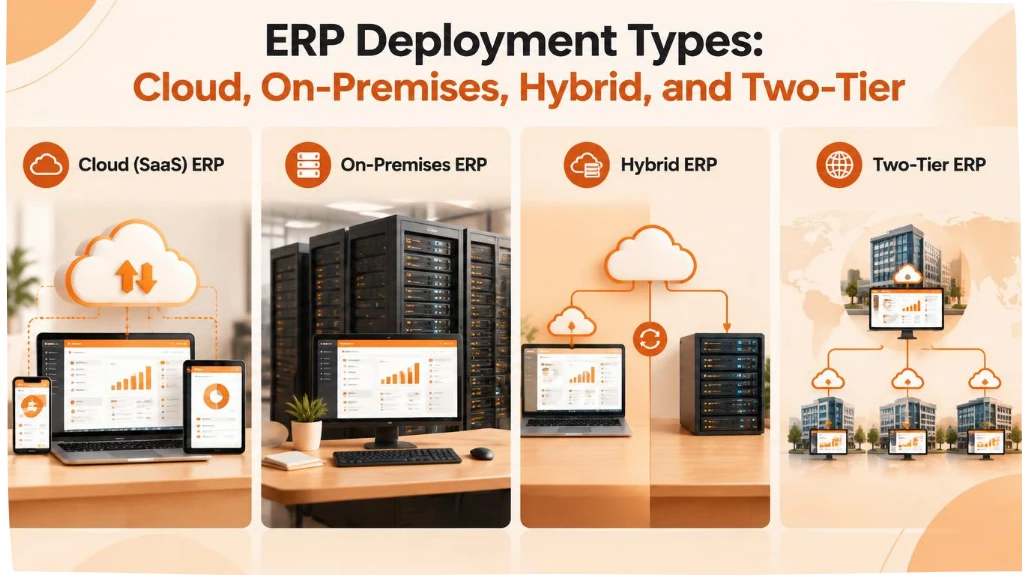
Your deployment choice affects cost structure, control, and how quickly your team can scale the system:
- Cloud (SaaS) ERP: The vendor hosts the system and charges a subscription fee, handling automatic updates and keeping upfront infrastructure costs low, which suits most mid-market and growing businesses.
- On-premises ERP: Your business installs and maintains the system on its own servers, gaining maximum control and customization at the cost of dedicated IT staff and higher capital investment.
- Hybrid ERP: This model combines cloud-based modules with on-premises systems, and businesses often choose it during a phased migration or when certain data must stay on local infrastructure for regulatory reasons.
- Two-tier ERP: This model pairs a core ERP system at headquarters with a lighter, cloud-based ERP at subsidiaries or regional offices, letting global enterprises standardize reporting while giving local teams more flexibility.
Benefits of Implementing ERP Software for Your Business
Deploying the right ERP systems delivers measurable gains across multiple areas of your business.
Productivity improves because teams no longer waste hours reconciling data between disconnected spreadsheets and legacy tools. When your finance, sales, and operations teams share one system, tasks that once took days, such as closing the books or generating a cross-department report, take hours instead.
Decision-making also becomes faster and more accurate. Real-time dashboards give leadership visibility into cash flow, inventory levels, and production status without waiting for a manual report.
Organizations that adopted Microsoft Dynamics 365 ERP reported more than 100% return on investment over three years, according to a Forrester Consulting Total Economic Impact study commissioned by Microsoft in February 2026, with a similar return reported for midmarket-focused deployments.
Cost savings extend beyond software licensing. Standardized processes reduce the manual labor, duplicate data entry, and integration patchwork that legacy systems require. Orkla Food Ingredients, a Microsoft Dynamics 365 customer, reported a 44% improvement in line-picking rate after standardizing operations on a single ERP platform.
Compliance and risk management improve as well, since ERP systems centralize audit trails, enforce approval workflows, and apply consistent financial controls across every department and location, which matters increasingly for businesses operating across multiple countries or regulatory environments.
Top 6 ERP Software Solutions in 2026
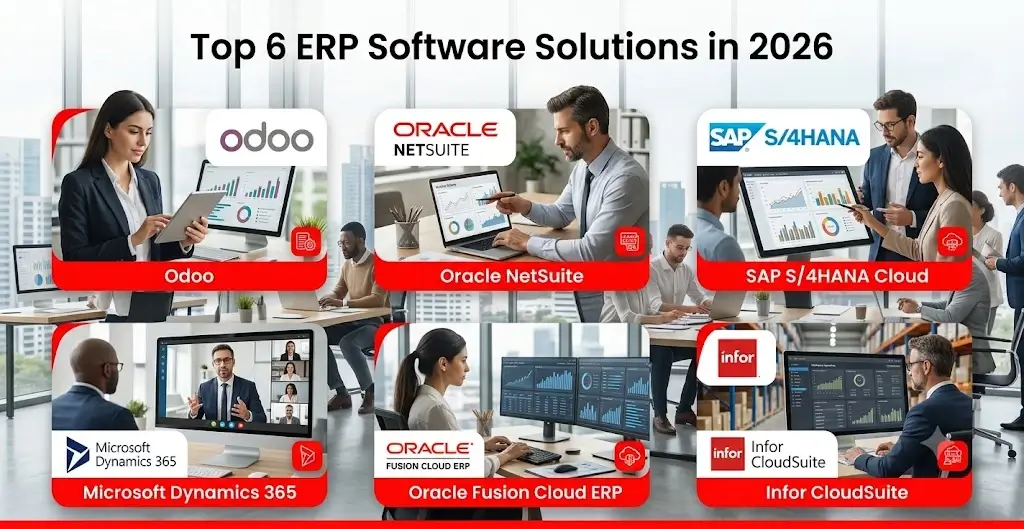
Dozens of ERP vendors compete for enterprise and mid-market budgets, but a handful consistently lead analyst evaluations.
The comparison below highlights platforms recognized in Gartner’s 2025 Magic Quadrant reports for Cloud ERP, plus Odoo, a widely adopted open-source-based platform popular with small and mid-market businesses, covering both product-centric and service-centric enterprise needs.
|
ERP Platform |
Best Fit | Deployment Model |
Notable Strength |
|---|---|---|---|
| Odoo | Small to mid-market businesses seeking modular, cost-flexible ERP | Cloud (SaaS) or on-premises; free Community edition or paid Enterprise edition | Modular open-source core; Enterprise tier adds native support, advanced apps, and mobile access |
| Oracle NetSuite | Fast-growing mid-market and multi-subsidiary businesses | Cloud (SaaS) | Unified financials, inventory, and e-commerce in one suite |
| SAP S/4HANA Cloud | Large enterprises with complex, multi-country operations | Cloud, hybrid | Deep industry-specific modules and in-memory analytics |
| Microsoft Dynamics 365 | Mid-market to enterprise businesses in the Microsoft ecosystem | Cloud, hybrid | Native Microsoft 365 and Copilot AI integration |
| Oracle Fusion Cloud ERP | Large, finance-heavy enterprises | Cloud (SaaS) | Advanced financial planning and embedded AI agents |
| Infor CloudSuite | Manufacturing, healthcare, and distribution-focused enterprises | Cloud, industry-specific | Deep vertical functionality for asset-intensive industries |
AI increasingly separates leading platforms from the rest of the market. Microsoft was named a Leader in IDC’s first AI-centric MarketScape for AI-Enabled Large Enterprise ERP Applications, a 2025 vendor assessment, while Gartner’s most recent Magic Quadrant reports specifically call out agentic AI capabilities as a differentiator among cloud ERP vendors.
When comparing ERP software examples like the ones listed here, ask each vendor how their AI features solve a specific problem in your operations, rather than treating AI as a generic feature checkbox.
Odoo deserves particular attention for its dual-edition model. The free, open-source Community edition covers core accounting, inventory, and sales modules, while the paid Enterprise edition adds native support, advanced manufacturing and HR modules, and mobile access.
This flexibility makes Odoo a common entry point for small and mid-market businesses that later scale into the Enterprise tier as their operations grow.
How to Choose the Right ERP Software for Your Business
Selecting an ERP system is a decision your business will likely live with for a decade or more. Sommer of TechVentive notes that most companies avoid replacing an ERP system for 10 to 15 years, and sometimes as long as 25, given the disruption a switch causes. That timeline makes the evaluation process worth doing carefully.
Consider these criteria before shortlisting vendors:
- Business size and complexity: A single-location small business needs a different platform than a multi-subsidiary enterprise operating across several countries.
- Industry-specific functionality: Manufacturing, healthcare, retail, and financial services each carry compliance and workflow requirements that generic ERP systems may not cover well.
- Deployment fit: Match your IT capacity and data residency requirements against the cloud, on-premises, hybrid, or two-tier models described above.
- Integration capability: Confirm that the ERP system connects cleanly with your existing CRM, e-commerce platform, and any custom applications your team already relies on.
- Total cost of ownership: Look beyond license fees to implementation, training, customization, and ongoing support costs, so you can budget realistically for the full project.
- Vendor and implementation partner track record: A platform performs only as well as the team that implements it, so review case studies and ask for references from your industry.
- Mobile and field access: Check whether the vendor’s native app meets your team’s on-the-go needs, or whether your business will need a custom mobile application built to extend ERP data to the field.
How AHT Tech Supports Your ERP Consulting and Deployment Journey
Selecting a platform from the list above is only the first step. In our experience working with manufacturing, retail, logistics and diverse clients across the US, Europe, and Asia, the businesses that get the most value from ERP treat implementation as a change management project, not just a software rollout.
AHT Tech has delivered enterprise software projects for more than 19 years, with a team of over 500 specialists supporting mid-market and enterprise clients across BFSI, healthcare, retail, manufacturing, logistics, etc. Our ERP consulting and implementation services cover platform consulting & selection, data migration, custom module configuration, and post-launch support for growing and mid-market businesses.
We also provide ERP software development services for custom module extensions and third-party integrations, in addition to consulting and deployment.
Our team typically starts with a process audit to map your current workflows before recommending a platform or deployment model, rather than defaulting to a single vendor. This approach helps you avoid the common trap of buying more ERP functionality than your business actually needs, which is one of the most frequent reasons ERP projects run over budget.
Highlights of our ERP consulting and deployment practice:
- Odoo focus: Our ERP practice is centered on Odoo, covering platform selection, module configuration, native support, and mobile rollout. Our main markets are Europe, Vietnam and Malaysia.
- Proven scale: More than 19+ years delivering enterprise software projects, with a team of over 500 specialists supporting mid-market and enterprise clients across BFSI, healthcare, retail, manufacturing, logistics, etc.
- Process-first methodology: Every engagement starts with a workflow audit before recommending a platform or deployment model, so you don’t pay for ERP functionality you don’t need.
- Beyond consulting: Custom module extensions and third-party integrations for businesses.
Conclusion
Choosing the right ERP software shapes how efficiently your business runs for the next decade, so the decision deserves more than a quick vendor comparison. Whether you lean toward NetSuite, SAP S/4HANA Cloud, Microsoft Dynamics 365, Odoo, or another platform from this list, match your choice to your industry, deployment needs, and long-term growth plans.
If you want an experienced partner to guide platform selection, data migration, and deployment, contact our ERP consulting team to start planning your next ERP project.
FAQs
What is the difference between ERP and CRM software?
ERP software manages your entire back-office operation, including finance, inventory, and HR, while CRM (customer relationship management) software focuses specifically on sales pipelines and customer interactions. Many ERP platforms, such as NetSuite and Dynamics 365, include native CRM modules, so the two systems increasingly overlap rather than compete.
How much does ERP software cost to implement?
ERP implementation costs vary widely based on the number of users, modules, deployment model, and customization required. Cloud ERP typically carries lower upfront costs than on-premises systems, and most implementation partners provide a custom quote once they understand your specific scope.
How long does ERP implementation take?
A mid-market ERP implementation typically takes four to nine months, depending on the number of modules, data migration complexity, and how many locations or subsidiaries the rollout covers. Enterprise-wide, multi-country deployments can take a year or longer.
Can small businesses use ERP software?
Yes. Cloud-based platforms such as NetSuite and Odoo Online offer scaled-down editions built for small and growing businesses, letting them access core financial and inventory management features without a large infrastructure investment. Odoo also offers a free, self-hosted Community edition for businesses that prefer to run and customize the system on their own servers.
What is the best ERP software for a growing mid-market business?
There is no single best platform for every mid-market business. NetSuite, Odoo, and Microsoft Dynamics 365 Business Central are commonly recommended for their scalability, but the right choice depends on your industry, integration needs, and growth plans.